
 How to Buy Crypto (ShakePay)
Tivimate IPTV in Canada: What the Player Does, What It Does Not, and How to Use It Well
If you searched Tivimate IPTV, you may have hit a confusing mix of app guides, IPTV sellers, APK pages, and “Premium” offers. The first thing to know is simple: TiviMate is a media player. It does not come with television channels. You add your own playlist or login from a service you are allowed to use.
However, that distinction matters in Canada because many websites use “TiviMate” as if it were the name of an IPTV subscription. In fact, it is not. The official developer describes TiviMate as a player only. Meanwhile, the CRTC makes clear that online viewing still depends on content and distribution rights. In other words, the app and the content source are two separate decisions.
This guide focuses on the part most setup pages skip. First, choose the right device, connection method, and feature mix before changing settings. It also shows how to identify the failing layer. The problem may sit in TiviMate, your playlist, guide data, or the stream.
Tivimate IPTV is a player, not a channel subscription
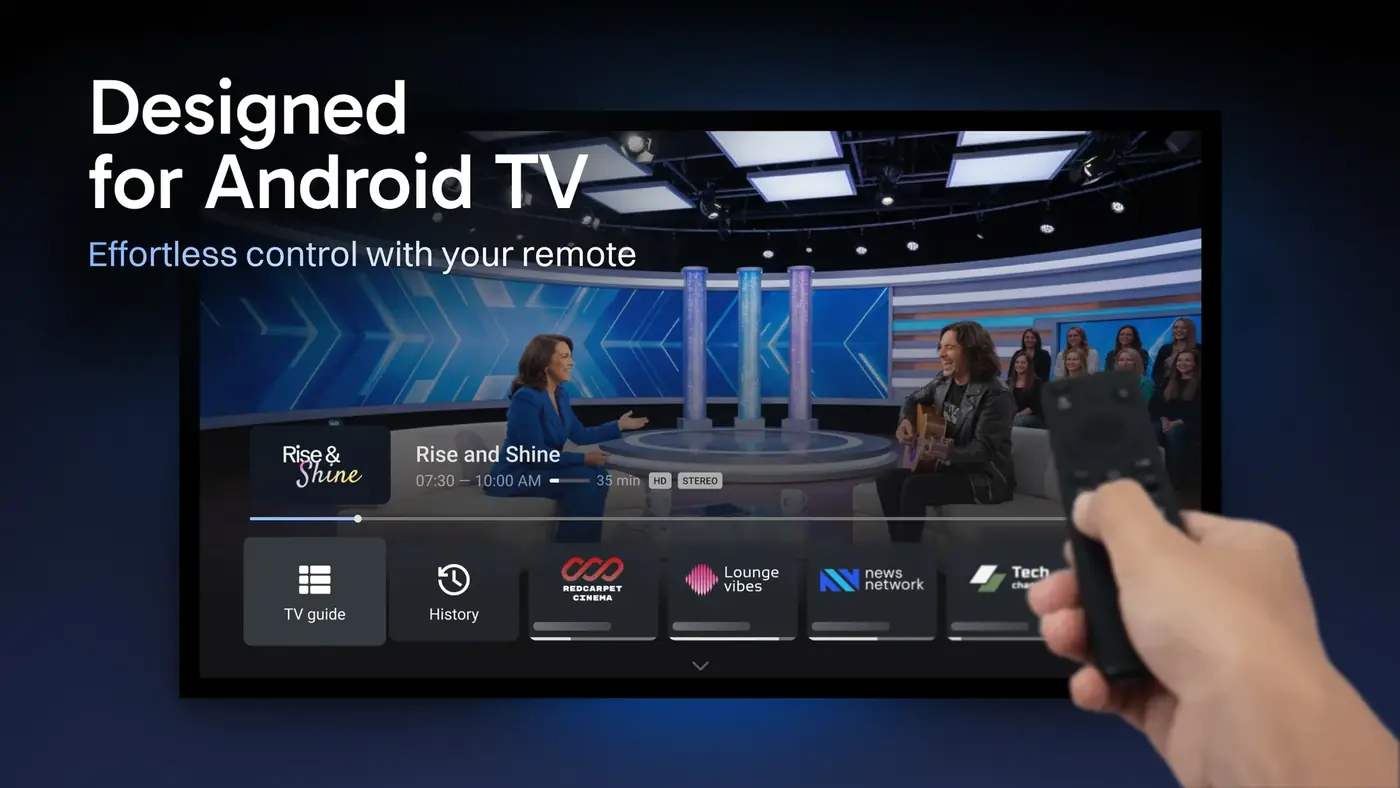
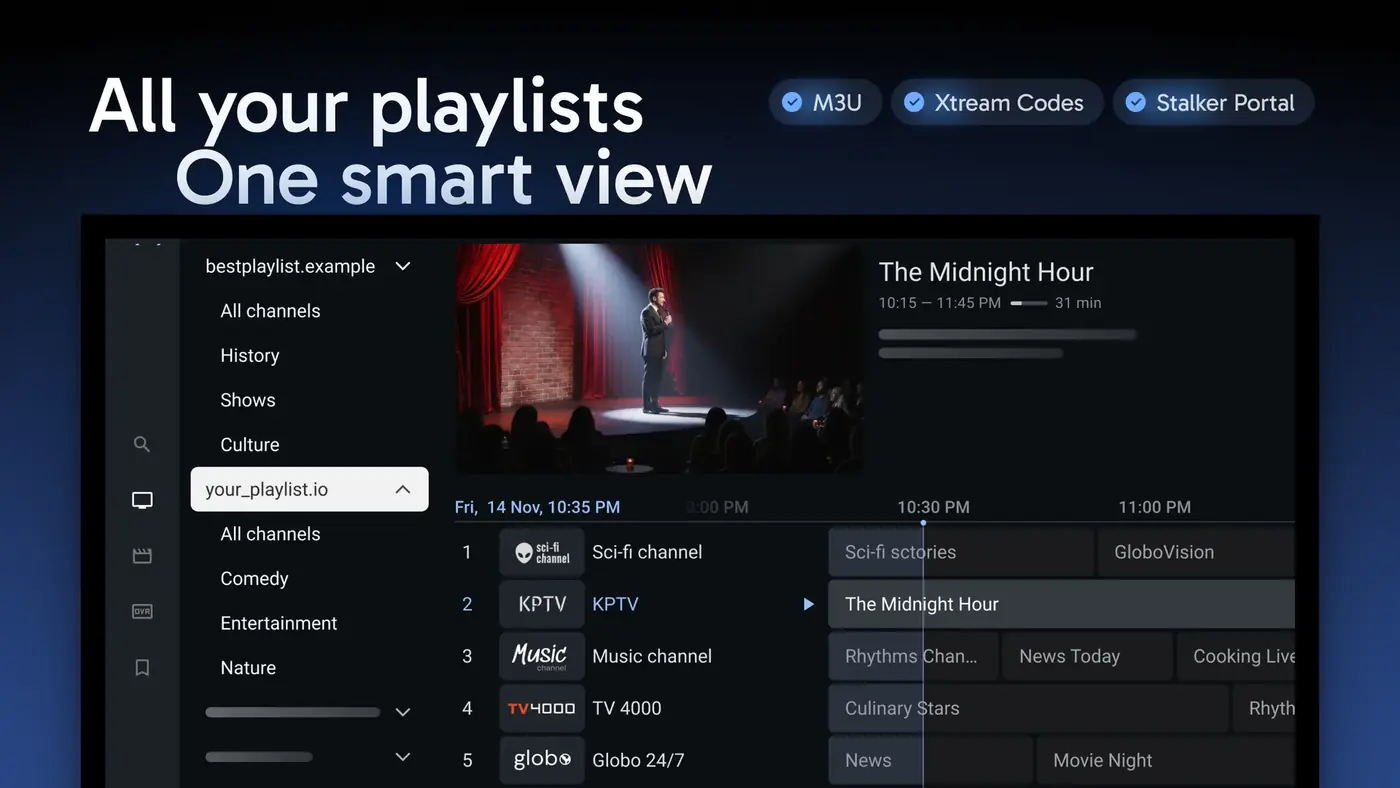
TiviMate sits between your television and the source you add. Think of it as the interface that organizes live channels, guide data, favourites, search, and other viewing tools. The official app supports common playlist methods such as M3U, Xtream Codes, and Stalker Portal. It also advertises features including multiple playlists, favourites, search, catch-up, recording, multiview, parental controls, and personalization.
The useful mental model is “player, credentials, content rights.” In other words, the player controls the interface. Your provider or playlist controls what streams are available. The rights attached to that content determine whether you may lawfully watch it. Paying for TiviMate does not buy channels, sports, films, or a Canadian TV package.
Before troubleshooting a missing channel, ask one question. Is the app failing, or is the source simply not providing that channel?
This one distinction prevents a lot of wasted effort. If a provider changes a channel URL, TiviMate cannot repair the source. If the guide data is wrong, changing the video decoder will not fix the schedule. Likewise, if the app itself crashes, contacting a channel provider may not solve the local software issue.
Which Canadian devices are a good fit for the TiviMate IPTV player?
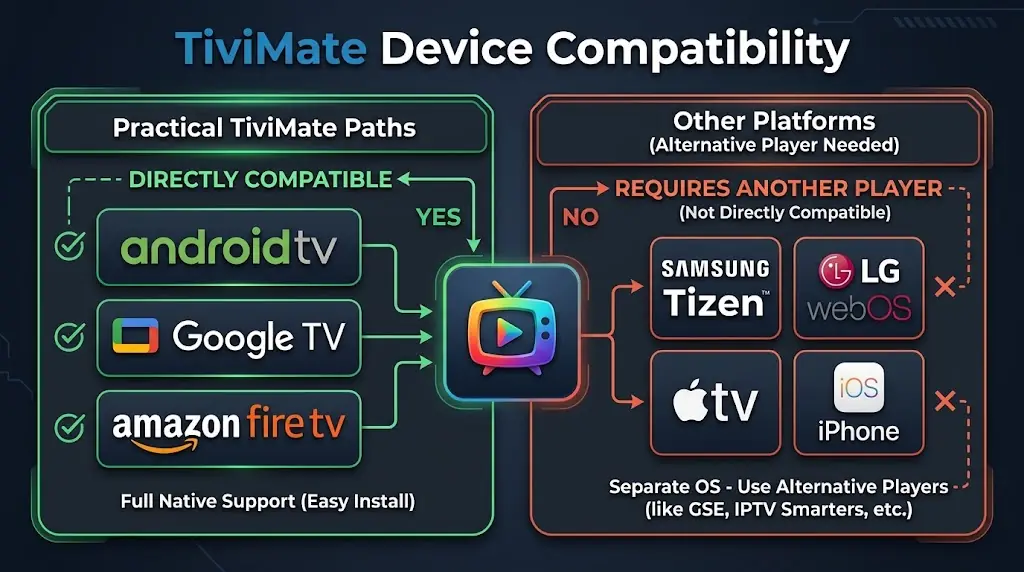
The official TiviMate listing says the app is designed for Android TV and remote-control navigation. It is not optimized for touch devices such as phones and tablets. That makes the best fit easy to understand. Use a television or streaming device built around Android TV, Google TV, or compatible Android-based TV software.
For a Canadian household, that usually means an Android TV box or Google TV device. A television running Android TV or Google TV can also work. Therefore, if you already own one, start there before buying another box. If you are still choosing hardware, the existing IPTV Box Canada guide is a better place to compare hardware. This article will not repeat that buying guide.
Fire TV is a special case. The official TiviMate website provides a direct APK route and a Downloader code. That is more useful than grabbing an APK from a random mirror. If your Fire TV needs Downloader first, use the existing Downloader App on Fire TV Stick guide. That avoids repeating the same sideload steps here.
Meanwhile, Samsung and LG televisions often cause the most confusion. Their native smart-TV systems are not Android TV. So, if you search for TiviMate not working on Samsung TV, start with platform compatibility. A bad password may not be the problem. Adding an Android TV or Fire TV device can change the platform without replacing the television.
The same logic applies to Apple TV and iPhone. TiviMate’s official positioning is Android TV-first. If your household is fully inside Apple’s TV ecosystem, choose a player made for that platform. Do not force an Android-focused app into the wrong environment.
Xtream Codes, M3U or Stalker Portal: choose the right login
In practice, most first-time users do not need to “pick the best protocol.” You should use the format your authorized service actually provides. TiviMate supports several common connection types, and choosing the matching one prevents needless conversion or copying errors.
TiviMate Xtream Codes setup makes sense when you receive three separate items: a server address, a username, and a password. This format can make account data easier to enter on a TV. You do not need to type one very long playlist URL. It can also let the player pull categories and related account data through the same login flow.
TiviMate M3U playlist setup fits services that provide a playlist URL or file. The main weakness is human error. For example, one missing character can break the playlist. Also, guide data may arrive through a separate XMLTV or EPG source. Therefore, a working channel list does not always guarantee a populated programme guide.
TiviMate Stalker Portal setup is for services that specifically issue portal-style access. Do not choose it merely because you saw “portal” in a generic tutorial. The authentication model can use a portal address and device-related identifiers. Follow the service’s own instructions exactly.
- You received server URL + username + password: start with Xtream Codes.
- You received one long playlist link: use M3U.
- You received a portal address and portal-specific device instructions: use Stalker Portal.
- You received none of these: ask the service for the supported login format before changing TiviMate settings.
A useful privacy habit is to treat playlist URLs like passwords. Some M3U links contain your username and password inside the URL itself. Do not post screenshots of those links in public forums or support groups unless you have hidden the sensitive parts.
How to configure TiviMate for everyday use without repeating device installation
- Install TiviMate through the correct device path. On Android TV or Google TV, use the official store listing when available. On Fire TV, use the official TiviMate APK route after following the existing Downloader guide. Avoid unknown APK mirrors.
- Identify the login type before typing anything. Match a server URL plus username and password to Xtream Codes. Match a long playlist link to M3U. Use provider-issued portal details for Stalker Portal.
- Add the playlist and let the first sync finish. Do not start changing decoder, buffer, or EPG settings while the app is still importing data.
- Test the source before customizing the interface. Open several authorized channels from different groups. Then test video-on-demand or catch-up only if your source says those features are included.
- Check the programme guide separately. A stream can play while EPG data is empty. If the guide is blank, verify the EPG source or refresh it before touching playback settings.
- Build a small favourites list. Put the channels you actually watch first. This makes a large playlist usable and gives you a quick set of known channels for later troubleshooting.
- Enable only the features you need. Recording, multiview, extra playlists, and deep personalization can add complexity. Get normal live playback stable first.
- Back up or document your working configuration before major changes. At minimum, keep your authorized credentials stored privately. That saves time after a reset or device replacement.
On Google TV, the site already has a broader Google TV IPTV setup guide. Use that for the device-level installation choices. The steps above focus only on what to do once TiviMate is the player you have chosen.
EPG, catch-up, recording and multiview solve different problems
These features are often grouped together. However, they depend on different things. Understanding that difference is one of the fastest ways to diagnose TiviMate.
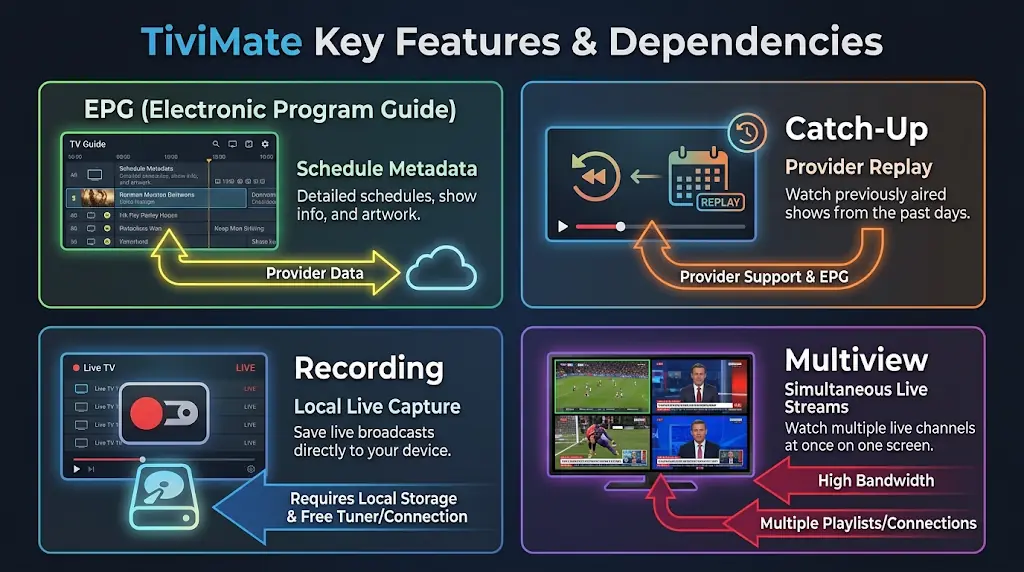
EPG is schedule data. It tells the app what programme is on now and what comes next. Therefore, “TiviMate EPG not working” can happen while live video still plays perfectly. If every channel says “No information,” first check whether the guide source loaded. If only a few channels are blank, the playlist and guide may not be mapped cleanly.
Additionally, Canadian time zones add another clue. If every programme is early or late by the same amount, first check the television or box time zone. A Toronto device should not be set to Vancouver time. Likewise, a Halifax device should not inherit another region after travel or a reset. Only after the device clock is correct should you start applying guide offsets.
Catch-up is not the same as recording. Catch-up normally depends on the source making older programmes available. TiviMate can expose that feature when the source supports it. Recording, by contrast, is a player function that saves a live stream for later viewing. Buying the player does not create a cloud DVR service from your content provider.
Multiview can create more than one live session. That is excellent for sports or news, but your provider may limit simultaneous streams. If one panel works and a second panel fails, do not assume TiviMate is broken. Check how many concurrent streams your plan allows.
Favourites and interface organization are different again. They are about how you manage a large playlist locally. A good setup hides noise and makes the channels you actually use easy to reach. That can improve daily usability more than adding another technical tweak.
When TiviMate looks broken, find the failing layer first
Random troubleshooting creates new problems because it changes several variables at once. Instead, sort the symptom into one of four layers.
- App layer: TiviMate crashes, freezes in menus, loses local settings, or a paid feature does not unlock. Focus on the app version, device storage, account state, or local app data.
- Login layer: the playlist will not load, credentials are rejected, or the server address fails immediately. Recheck the exact login details and whether the account is active.
- Guide layer: channels play but programme names, times, or descriptions are missing or wrong. Focus on EPG source, mapping, refresh, and device time.
- Stream layer: menus and guide work but one or more channels buffer, stop, or fail. Test several channels before blaming the app. The source, network path, Wi-Fi, or provider can be the problem.
As a result, that four-layer model also tells you who to contact. A TiviMate interface crash belongs with the app developer. Expired credentials belong with the service that issued them. Wrong EPG data usually belongs with the guide or service source. Repeated live-stream buffering needs network and stream testing.
For detailed network tests, use the existing IPTV buffering guide for Canada. Use it when the video stream itself is unstable. There is no value in duplicating its Wi-Fi, Ethernet, device, and server tests inside this TiviMate article.
One more practical check: do not use a fast speed test as proof that one IPTV source must work. A speed test and a live stream may take completely different network paths. Test another known legal streaming service on the same device, then compare the result.
Is TiviMate Premium worth it for your setup?
The answer depends on how you use the player, not on how many channels a seller advertises. TiviMate offers paid options that unlock application features. The official terms are explicit that a purchase does not include channels, streams, or media content.
If your goal is simply to test one authorized playlist on one television, start with the basic experience first. Confirm that the device is compatible, the playlist loads, the guide makes sense, and normal playback is stable. That tells you whether the app fits your household before you pay for convenience features.
Premium becomes more relevant when you want a more advanced television workflow. For example, you may want several playlists, recording, multiview, or deeper personalization. Other paid controls may also matter on your current app version. Because pricing and feature packaging can change, check the price inside the official purchase flow. Do not rely on an old Canadian blog post.
If you are asking “TiviMate Premium worth it,” use one rule. Pay for a feature you can name. Do not pay because a provider says Premium is required for its channels. Your service credentials and your TiviMate licence are separate products.
Finally, this protects you from a common sales trick. A website may advertise “TiviMate Premium IPTV” as if one payment covers the app and a giant channel package. Verify what you are actually buying. The official TiviMate purchase unlocks player features only.
FAQ
Is Tivimate IPTV a TV service or only a player?
It is a player. You must add your own authorized playlist or service credentials. The official developer says TiviMate does not provide, host, or distribute channels or streams.
Does TiviMate work on Samsung or LG Smart TVs?
Not as a native Tizen or webOS app. TiviMate is designed around Android TV-style devices. You can keep the television and add a compatible external streaming device if you specifically want TiviMate.
Can I use TiviMate on iPhone or Apple TV?
TiviMate is positioned as an Android TV player, not an Apple TV or iPhone app. For an Apple-only setup, choose a player built for tvOS or iOS instead of forcing an Android workflow.
Is Xtream Codes better than an M3U link in TiviMate?
Use the method your service supports. Xtream Codes is often easier to enter because it separates the server, username, and password. M3U is still useful when your provider gives you a playlist URL. Neither method can improve a weak or unauthorized source by itself.
Why does TiviMate say “No information” when channels still play?
The stream and the programme guide are separate layers. Your live channel can work while EPG data is missing, stale, or mismatched. Refresh the guide, verify the EPG source, and check the device time before changing playback settings.
Is TiviMate Premium worth it if I only use one playlist?
It may not be necessary at first. Start by confirming that the basic player fits your device and viewing habits. Upgrade only when you need a specific paid feature that improves how you actually watch TV.
Does TiviMate Premium include channels?
No. A TiviMate purchase unlocks app features only. It does not include a television package, IPTV subscription, sports rights, films, or live channels.
Can TiviMate recording on Firestick work with a one-stream plan?
Recording uses a live stream, so provider connection limits can matter. If you record one channel while opening another, your service may treat that as more than one simultaneous stream. Also make sure the device has suitable storage for the recording.
Why is my TiviMate EPG one hour early or late in Canada?
Check the device’s date, time, and Canadian time zone first. Daylight-saving changes or a bad EPG offset can shift every programme by the same amount. Fix the system clock before applying a manual guide offset.
Where should Canadians download TiviMate safely?
Use the official Google Play listing on compatible Android TV devices. Alternatively, use the official TiviMate website for its direct APK route. Avoid third-party APK mirrors when an official source is available.




Comments (0)
Leave a comment