
Parental Control Panic: When Kids Have No Filters
It usually starts quietly. A parent in Québec notices their child repeating words they never use at home. In Ontario, a family realizes their eight-year-old stayed up past midnight watching content on the living room TV. In Alberta, a tablet becomes a constant argument. By 2025, screens are everywhere in Canadian homes, and the real fear is no longer “too much screen time.” It’s the absence of effective parental control.
Streaming platforms, IPTV apps, smart TVs, game consoles, phones, and tablets all compete for attention. Yet parents are often left with fragmented, confusing, or outdated control tools. Some work on one device but not another. Others break after an update. And some give a false sense of safety while doing almost nothing.
In Canada, this issue is amplified by fast internet, unlimited data plans, and a household reality where both parents work, kids come home earlier, and screens fill the gap. When controls fail—or don’t exist—panic sets in.

Why Parental Control Became Harder in 2025
On paper, things should be easier. Smart TVs advertise “family modes.” Routers promise “advanced filtering.” Streaming apps claim age-based profiles. In reality, the ecosystem is fractured.
A Samsung Tizen TV updated in 2024 behaves differently than one from 2025. LG WebOS handles PINs differently depending on region. Google TV updates silently change menu paths. IPTV apps rarely follow the same standards as Netflix or Disney+.
Canadian internet providers add another layer. Bell, Rogers, Vidéotron, Telus, Cogeco, and Shaw each ship modems with different parental features. Some rely on cloud dashboards, others on local admin panels. When a firmware update rolls out, settings can reset.
The result: parents think controls are active, while kids discover shortcuts faster than adults expect.
The Canadian Internet Reality
Canada’s internet landscape matters here. Fibre connections from Bell or Telus deliver consistent high speeds. Cable from Rogers, Vidéotron, or Cogeco can fluctuate during peak hours. DSL still exists in rural areas, slower and less predictable.
Why does this matter for parental control? Because buffering, freezing, or app crashes often push kids to switch apps, devices, or sources. Controls set on one path don’t follow them to another.
Smart TVs: Where Most Parents Lose Control
The living room TV feels safer than a phone. It’s bigger, shared, and visible. But in 2025, smart TVs are fully autonomous platforms.
Samsung Tizen (2023–2025)
Samsung TVs sold in Canada ship with Tizen OS. They offer PIN-based restrictions for apps and channels. The problem? IPTV apps installed via USB or third-party stores often bypass Samsung’s native controls.
Another issue: switching the TV region resets restrictions. Some kids learn this trick from YouTube tutorials.
LG WebOS (2022–2025)
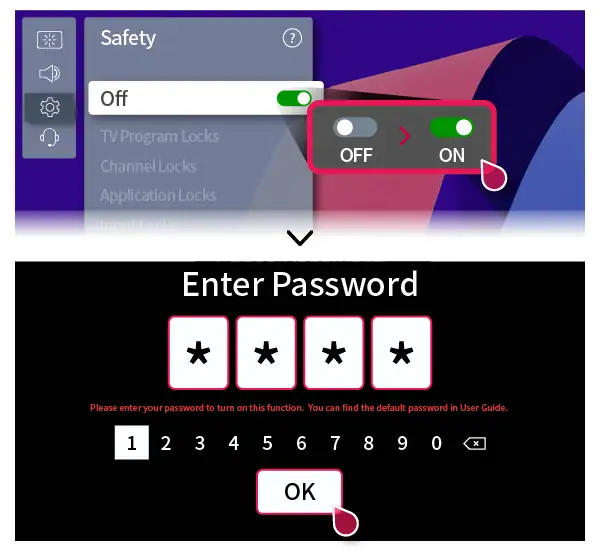
LG’s WebOS includes content ratings and app locks. However, IPTV apps running through web players or external boxes ignore WebOS entirely. Parents assume the lock applies globally—it doesn’t.
Sony Google TV
Google TV integrates well with Google Family Link. Profiles can be restricted, time-limited, and monitored. But if a Chromecast with Google TV is plugged into HDMI, it becomes a separate universe unless configured properly.
IPTV Boxes and Streaming Devices: The Real Gap
In Canadian homes, IPTV rarely runs directly on the TV OS. It runs on boxes.
Common Devices in Canada
- Firestick 4K Max
- Chromecast with Google TV
- Formuler Z series
- BuzzTV boxes
These devices differ massively in how they handle restrictions.
| Device | Native Parental Control | Real Effectiveness |
|---|---|---|
| Firestick 4K Max | Amazon PIN + profiles | Moderate, app-dependent |
| Chromecast with Google TV | Google Family Link | Strong if configured correctly |
| Formuler | App-level PINs | Weak if IPTV app ignores them |
| BuzzTV | Basic channel locks | Inconsistent |
Many IPTV apps implement their own PIN systems. Others don’t. Some reset after updates. Others store the PIN locally, making factory resets a workaround.
The Router Myth: “I Blocked It at the Source”
Parents often turn to the router as a final authority. In Canada, this usually means:
- Bell Home Hub 4000
- Rogers Ignite Gateway
- Hitron modems
- eero mesh systems
Router-level parental control works best for websites, not apps. IPTV streams often use encrypted connections, rotating IPs, and CDN endpoints shared with legitimate services.
Blocking one IP can break YouTube or Netflix. DNS-based filtering helps, but it’s not precise.
Real Firewall Behavior in Canada
ISPs sometimes apply traffic shaping during peak hours. This can cause IPTV buffering, pushing kids to try alternative apps or sources. Controls tied to one app suddenly become irrelevant.
Using third-party DNS (like CleanBrowsing or OpenDNS) can help filter categories, but IPTV streams often bypass DNS entirely once connected.
Mid-Article Reality Check
Many Canadian parents don’t lack concern. They lack visibility.
At this point, frustration peaks. This is usually when parents start searching for “safe IPTV” or “family-friendly streaming.” A user from streamiptv.ca once shared that their biggest challenge wasn’t content quality—it was ensuring their kids didn’t wander into adult channels by accident.
Looking for practical IPTV habits that work in real homes?
Some families choose to test a controlled setup for 24 hours before committing, just to understand how devices behave in their own environment.
Speed, Quality, and Control: An Overlooked Connection
Parental control isn’t just about blocking. It’s also about preventing frustration-driven behavior.
When 4K streams stutter, kids switch apps. When buffering hits during cartoons, they search alternatives.
| Usage | Recommended Speed (per stream) |
|---|---|
| HD | 8–10 Mbps |
| Full HD | 12–15 Mbps |
| 4K | 25–30 Mbps |
In condos, WiFi 6 and WiFi 6E matter. Concrete walls kill signals. A weak connection creates loopholes.
Common Scams Targeting Parents in 2025
Fear sells. Scammers know this.
- Telegram resellers promising “kids-only IPTV”
- WhatsApp messages offering “locked channels”
- Fake MAC-based subscriptions
- Phishing panels that collect emails and passwords
Once payment is sent, support disappears. Or worse, adult content appears without warning.
Canadian consumer protection agencies have warned repeatedly about messaging-app-based digital service scams. Reputable coverage can be found through outlets like CBC News and The Globe and Mail.

Realistic Parental Control Solutions That Work
No single tool fixes everything. Effective parental control in 2025 is layered.
Layer 1: Device Profiles
Use Google Family Link on Chromecast and Android TV. Lock profiles, restrict installs, and set bedtime limits.
Layer 2: App-Level Discipline
Choose IPTV apps that support user profiles and PINs. Test updates. Re-check settings monthly.
Layer 3: Network Awareness
Enable basic filtering on routers. Use DNS filtering as a safety net, not a solution.
Layer 4: Physical Habits
Keep TVs in shared spaces. Avoid personal boxes in bedrooms. No technical solution replaces presence.
| Approach | Pros | Cons |
|---|---|---|
| Device profiles | Granular, user-based | Needs setup time |
| Router filtering | Global coverage | Limited with IPTV |
| App PINs | Simple | Easily reset |
FAQ: Parental Control in Canadian Homes
Is parental control effective with IPTV?
Parental control can be effective with IPTV, but only when combined across devices, apps, and habits. IPTV apps vary widely, and relying on one setting alone is rarely enough in Canadian homes.
Can ISPs like Bell or Rogers block adult IPTV content?
Canadian ISPs can block websites, not specific IPTV streams. Their tools are designed for web filtering, not encrypted video delivery used by IPTV apps.
Does WiFi speed affect parental control?
Indirectly, yes. Poor speed causes buffering, pushing users to switch apps or sources where controls may not exist. Stable WiFi reduces risky behavior.
Are IPTV boxes safer than smart TVs for kids?
Not necessarily. Boxes like Firestick or Formuler rely heavily on app-level controls. Without careful setup, they can be less predictable than native smart TV systems.
How often should parents review parental control settings?
At least monthly. Updates, new apps, and firmware changes can reset or bypass existing parental control configurations.
Is there a fully “kid-safe” IPTV service?
No service is automatically kid-safe. Some families choose providers that emphasize stability and transparency, then apply their own layered controls.
Can kids bypass parental control easily?
Older kids often can, especially with online tutorials. That’s why combining technical controls with open discussion is crucial.







Comments (0)